




Try the app. Understand your choice.
Ontdek hoe je kijkt, zoekt en favorieten bewaart. Kies een onderwerp en bekijk de bediening stap voor stap.
← Back to Amiko A9 Green 4K Android MediaspelerMYTV2YOU ARE VIEWINGMYTV2 · Android / LinuxChoose another app +







01Start−
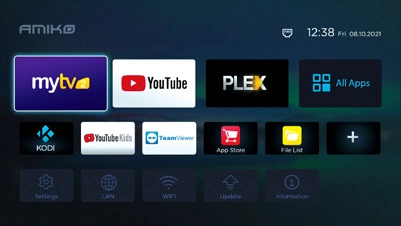
The central place for your TV setup. Open the app here and choose content available from your service.
- Open the tile named MYTV2 on your Amiko.
- Choose the source or connection belonging to your own service.
- Check the full app name: Formuler MYTVOnline 2 uses a different guide.
02Live TV+
Open the channel list and change channels without leaving the TV app. The layout depends on your source and preferences.
- Open Live TV and press OK for the channel list.
- Use the arrows to browse channels and available groups.
- Select a channel and confirm with OK. Use Back to close the window.
03Films and series+
View on-demand titles available from your service. A receiver or TV app does not supply a film subscription itself.
- Open VOD or the films/series section in MYTV2.
- Choose a category or search for a title.
- Open the information and play only content your service grants access to.
04TV guide+
The EPG shows current and upcoming programmes. An empty guide means the source is not supplying guide data or settings need checking.
- Open the TV guide using EPG/GUIDE or the app menu.
- Browse to a channel, time or day and select a programme.
- Open programme information. Catch-up appears only if supported by your service for that programme.
05Recording+
Save a programme if your receiver, software and service support it. First ensure suitable storage with enough free space.
- Connect suitable USB storage or select available internal storage if your model supports it.
- Open the guide or recording options and choose a programme or immediate recording.
- Check start and end times, storage location and any connection count limits.
06Pause Live TV / timeshift+
Pause Live TV and resume from the temporary buffer.
- Check that suitable timeshift or DVR storage is selected.
- Open a channel and press Pause when timeshift is available for that stream.
- Resume with Play and use the available action to return to live. The buffer is not a permanently saved recording.