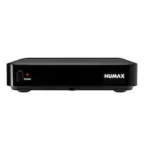

Amiko HD 8265+ Combo – set up satellite, terrestrial and cable TV
Start with your TV signal
Trace the coax cable back to its source. Use the satellite input for a dish and the aerial/cable input for terrestrial or cable TV. Select the matching signal type when scanning.
Connections and features
- TV signal
- DVB-S2 / DVB-T2 / DVB-C
- USB
- 2 × USB 2.0
- Codec
- H.265/HEVC
Connection guide for Amiko HD 8265+ Combo
Choose the connection you want to use at home.
My TV has a free HDMI input
Check whether the Amiko HD 8265+ Combo has an output marked HDMI. Connect it to a free TV input and select the same input number.
My TV has no free HDMI input
If all HDMI inputs are occupied, temporarily use an input from another device. If the TV has no HDMI input at all, check the receiver outputs and TV inputs before buying an adapter.
I receive TV through a coax cable
Check the signal type first. DVB-S/S2 is satellite, DVB-T/T2 is terrestrial and DVB-C is cable. The connector alone does not establish which channels you can receive. Tuners listed for this version: DVB-S2, DVB-T2, DVB-C.
What cable length do I need?
Measure the route along the furniture or wall, including bends. Add up all sections in centimetres. Optionally allow extra length to move the receiver forwards.
View the shop version · Amiko HD 8265+ Combo · More Amiko guides · Technical source · www.astrasat.nl