

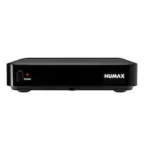

VU+ Zero 4K – connect HDMI OUT and Ethernet
Start with your TV signal
Connect HDMI OUT to a free TV input. Then check the tuner actually fitted to your unit. Select satellite, terrestrial or cable tuning to match the tuner label and incoming signal.
Connections and features
- HDMI
- 1 × HDMI 2.0 OUT
- Ethernet
- 10/100 Mbps
- USB
- 1 × USB 2.0
Connection guide for VU+ Zero 4K
Choose the connection you want to use at home.
My TV has a free HDMI input
Connect the HDMI output on the VU+ Zero 4K to the free TV input. If that input is labelled HDMI 2, select HDMI 2 in the TV’s source menu.
My TV has no free HDMI input
If all HDMI inputs are occupied, temporarily use an input from another device. If the TV has no HDMI input at all, check the receiver outputs and TV inputs before buying an adapter.
I want to use a cable from my router
Connect an Ethernet cable between a LAN port on your router and the receiver. The listed port speed is 100 Mbit/s. Your internet plan or streaming service may be slower.
I want to connect wirelessly
Check the manual for this version to see whether Wi-Fi is built in or requires a specific adapter.
What cable length do I need?
Measure the route along the furniture or wall, including bends. Add up all sections in centimetres. Optionally allow extra length to move the receiver forwards.
View the shop version · VU+ Zero 4K · More VU+ guides · Technical source · www.vuplus.de